

3 Ways to Test a Capacitor: Accurate & Safe Methods (2025 Guide)
Quick Summary: To determine if a capacitor is “dead” or “alive,” there are three primary methods relied upon by electrical experts: (1) Visual Inspection for physical failure, (2) Multimeter Capacitance Mode (the gold standard for accuracy), and (3) Multimeter Resistance (Ohm) Mode to check charging ability if your meter lacks a capacitor setting.
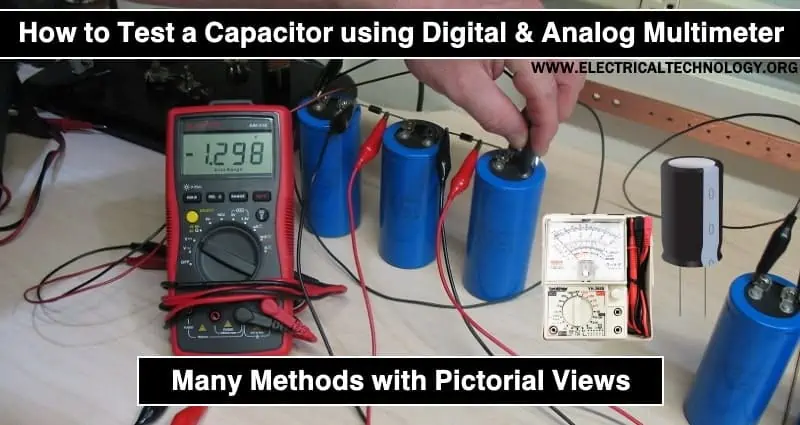
Whether you are troubleshooting a simple household fan or performing complex inverter maintenance and repair, understanding the health of your capacitors is critical for system stability.
Table of Contents
- ⚠️ Critical Safety Warning (Mandatory)
- Step 0: The Discharge Process
- Method 1: Visual Inspection (60% Accuracy)
- Method 2: Multimeter Capacitance Mode (Gold Standard)
- Method 3: Multimeter Resistance Mode (Check Function)
- Summary: Troubleshooting Cheat Sheet
- Why Do Capacitors Fail? (Root Cause Analysis)
- Frequently Asked Questions (FAQ)
⚠️ CRITICAL SAFETY WARNING (READ FIRST)
Capacitors store high-voltage energy even when disconnected from power. NEVER touch the terminals before discharging them. Skipping this step can result in severe electric shock or instantly destroy your multimeter.
If you are working with industrial equipment, such as inside a medium voltage cabinet maintenance services scenario, the stored energy can be lethal. Always prioritize safety.
Step 0: The Discharge Process – MANDATORY
Expert Insight: Before removing the capacitor from the circuit board (PCB) or applying probes, you must drain the stored charge using an insulated tool or a bleeding resistor to prevent injury or equipment damage.
- Kill Power: Unplug the device and turn off the circuit breaker. Tip: Understanding how protection devices work is crucial; learn more about overload relays and trip curves.
- Tools: Use a screwdriver with an insulated handle or, for larger high-voltage capacitors (like in HVAC or microwaves), use a bleeding resistor ($20k\Omega, 2W$).
Procedure:
- Quick Method (Low Voltage): Holding the insulated handle, touch the metal shaft of the screwdriver to one terminal, then tilt it to bridge the contact to the other terminal. You may hear a “pop” or see a spark.
- Professional Method (High Voltage): Bridge the two terminals with the resistor probes for 5–10 seconds to drain the voltage safely and slowly.
Note: For comprehensive checks on large-scale power systems, consider a professional electrical system assessment before attempting DIY repairs.
Method 1: Visual Inspection
Quick Answer: This method has 60% accuracy and detects catastrophic physical failures only. If you see bulging, leaking, or corrosion, replace immediately—no testing required.
This is your first line of defense. If you see these signs, replace the component immediately:
- Bulging Vents: The top of the capacitor (often scored with a ‘K’ or ‘X’) is domed or puffy instead of flat.
- Leaking Electrolyte: Brown or black crusty discharge around the leads or the base.
- Warped Casing: The plastic sleeve is shrunken, melted, or the body is misshapen. This often happens due to excessive heat, which can be detected early with a thermal scan electrical cabinet service.
- Corroded Leads: The metal legs are rusted or detached.
Method 2: Using a Multimeter (Capacitance Mode) – THE GOLD STANDARD
Quick Answer: This is the most accurate method (99%), verifying specific microfarad ratings using a multimeter with the capacitor symbol (-|(-). A healthy capacitor usually falls within ±5% to ±20% tolerance of its label.
Requirement: A multimeter (DMM) with the capacitor symbol -|(- or labeled CAP.
The Process:
- Remove Capacitor: Desolder or disconnect at least one leg from the circuit.
- Discharge: Perform Step 0 (Mandatory).
- Set Meter: Turn the dial to the Capacitor symbol (-|(-). If your meter isn’t auto-ranging, select a range higher than the capacitor’s label.
- Connect Probes:
- Red Probe to the Positive (+) terminal.
- Black Probe to the Negative (-) terminal (marked with a stripe/dash on the side).
- Note: Non-polarized caps (often found in motor start circuits—see our motor monitoring solutions) can be connected either way.
- Analyze Results: Wait a few seconds for the reading to stabilize. Compare the number to the rating printed on the capacitor.
Example: A capacitor is rated for 1000µF ± 20%.
- Good: Reads between 950µF and 1050µF.
- Bad: Reads below 500µF (dried out) or shows nothing/zero (open).
Method 3: Using a Multimeter (Resistance/Ohms Mode)
Quick Answer: With 70% accuracy, this method determines if the capacitor can charge and discharge. A healthy capacitor shows low resistance initially, which then climbs rapidly to OL (Open Loop) or infinity.
The Logic: A healthy capacitor shows low resistance initially (as it absorbs current), then resistance rises to infinity (as it fills up). This behavior is fundamental to electrical engineering. (Aspiring electricians can learn more in our top 7 essential books electricians 2025).
The Process:
- Set Meter: Turn dial to Resistance/Ohms (Ω). Select a high range (e.g., 20kΩ or 1MΩ).
- Connect Probes: Red to Positive, Black to Negative.
- Watch the Screen:
- Good Status: The numbers start low and climb rapidly until the screen shows OL (Open Loop) or ∞. This proves the capacitor is accepting a charge.
- Bad (Shorted): The reading stays very low (near 0Ω) and does not rise. The internal dielectric is punctured.
- Bad (Open): The screen shows OL immediately with no climbing numbers. The internal connection is broken.
Summary: Troubleshooting Cheat Sheet
| Method | Reading/Observation | Status | Action |
|---|---|---|---|
| Visual | Bulging, leaking, cracks | DEAD | Replace Immediately |
| Capacitance | Value within label range (± 20%) | GOOD | Keep / Re-install |
| Capacitance | Value significantly lower (< 50%) | WEAK | Replace (Causes voltage drop) |
| Ohms | Resistance rises → OL | GOOD | Likely functional |
| Ohms | Resistance stays at 0Ω | SHORTED | Replace Immediately |
| Ohms | Instant OL (No rise) | OPEN | Replace Immediately |
A Helpful Next Step
If you have confirmed your capacitor is faulty, write down the Voltage (V) and Capacitance (µF) ratings from the old unit before ordering a replacement. Remember the “Golden Rule of Replacement”:
- Capacitance (µF): Must be the exact same.
- Voltage (V): Must be the same or higher. (e.g., If the old one is 25V, you can safely use a 35V or 50V replacement, but never a 16V one).
PART 3: WHY DO CAPACITORS FAIL? (ROOT CAUSE ANALYSIS)
Quick Answer: The top 3 silent killers of capacitors are Excessive Heat (evaporates electrolyte), Harmonic Distortion (“Dirty Power” causing internal overheating), and Voltage Spikes (lightning or grid switching punching through the dielectric).
Finding a bad capacitor is only half the battle. If you replace a capacitor without understanding why it failed, the new one may burn out just as quickly. Based on our 20+ years of field experience, here are the top silent killers of capacitors.
1. Excessive Heat (The #1 Enemy)
Electrolytic capacitors contain a liquid electrolyte that can evaporate over time. High ambient temperatures accelerate this process, causing the capacitor to “dry out” and lose capacitance.
- The Fix: Ensure your electrical cabinets have proper ventilation. In industrial settings, invisible hotspots are a major risk. We highly recommend scheduling a periodic thermal scan electrical cabinet service to detect overheating components before they fail.
2. Harmonic Distortion (“Dirty Power”)
In modern electrical systems heavily loaded with non-linear loads (like VFDs, LED lighting, and computers), harmonic currents can flow through capacitors, causing them to overheat from the inside out.
- The Diagnosis: If you notice capacitors swelling repeatedly in your power factor correction panels, you likely have a harmonics issue. This requires a specialized harmonic filtering solutions assessment to protect your equipment.
3. Voltage Spikes & Transients
A capacitor is rated for a specific maximum voltage (e.g., 400V). Sudden spikes from lightning or grid switching can punch through the dielectric layer, causing a short circuit.
- Prevention: Regular maintenance of your protection systems is vital. Ensure your surge protection devices and low voltage electrical cabinet maintenance protocols are up to date.
PART 4: FREQUENTLY ASKED QUESTIONS (FAQ)
Q1: Can a capacitor look good but still be bad?
Answer: Yes. A capacitor can have high ESR (Equivalent Series Resistance) or be internally open while looking perfect physically. Visual inspection is only 60% accurate.
For critical systems like renewable energy inverters, precise testing is required to prevent system-wide errors. Related: Troubleshooting specific error codes often involves checking these hidden faults. See our guide on Growatt inverter error codes.
Q2: Is it safe to replace a 370V capacitor with a 440V one?
Answer: Yes, absolutely. You can always go UP in voltage (stronger insulation), but never change the microfarad (µF) value as it affects motor speed/current.
Using a higher voltage rating (like 440V) simply means the capacitor has thicker insulation and can handle more stress. For precise motor diagnostics, consider our motor monitoring solutions.
Q3: How often should capacitors be replaced in industrial equipment?
Answer: In heavy-duty environments, capacitors typically have a lifespan of 5–7 years. Proactive replacement is cheaper than downtime.
For critical infrastructure like substations, this is part of our comprehensive transformer station maintenance service.
Q4: My capacitor has 3 terminals, not 2. How do I test it?
Answer: This is a Dual Run Capacitor (C, HERM, FAN). You must measure from C to HERM and C to FAN separately.
This is commonly found in HVAC units, combining the compressor and fan capacitors into one body.
PART 5: ADVANCED TESTING SCENARIOS (PRO TIPS)
Method 4: The “Spark Test” (Emergency Use Only)
Quick Answer: An old-school trick with Low Accuracy that checks if a capacitor holds a charge by creating a spark. Note: This stresses the dielectric.
⚠️ WARNING: This method is dangerous and recommended ONLY for professional electricians dealing with high-voltage run capacitors (HVAC/Motors). Never try this on small electronic capacitors.
If you are stuck on a rooftop fixing an AC unit without a multimeter, old-school techs use this trick:
- Charge: Apply voltage to the capacitor for 1-2 seconds (safely).
- Short: Short the terminals with an insulated screwdriver.
- Result: A strong, snappy spark indicates the capacitor is holding a charge. No spark means it’s likely open.
Note: This stresses the dielectric and can degrade the component. For a proper health check of your power infrastructure, rely on professional electrical system maintenance service rather than rough field tests.
Special Case: Testing SMD Capacitors (Surface Mount Device)
Quick Answer: For tiny capacitors without legs (SMD) used in modern electronics, use “Smart Tweezers” (LCR Meter Tweezers) to measure capacitance and ESR instantly.
Modern electronics (like IoT sensors or controller boards) use tiny SMD capacitors that have no legs.
- The Challenge: You cannot test these easily in-circuit due to parallel components affecting the reading.
- The Solution: Use “Smart Tweezers” (LCR Meter Tweezers). These clamp onto the tiny component to measure capacitance and ESR instantly.
- Context: As industries move towards what is iot internet of things, repairing these miniaturized boards becomes a critical skill.
🚀 Conclusion: When to Call the Professionals
While testing a small capacitor for a ceiling fan is a great DIY skill, electrical issues in commercial or industrial systems are far more complex. A failed capacitor might be a symptom of a larger issue like insulation breakdown or grid instability.
Don’t risk your facility’s safety. For advanced diagnostics, including online partial discharge measurement service and full system audits, trust the experts at KTH Electric.
- Need advice? Read more from our technical leader, Dr. Khuong Nguyen, or check out our latest insights on electrical engineering interview questions answers to deepen your knowledge.
- Ready to schedule service? Contact us today for a consultation.
Author: KTH Electric Team | Reviewed by: Do Tan Quan & Dr. Khuong Nguyen