
Electrical Symbols Guide: The Engineer’s Handbook to IEC & ANSI Standards (2026)
By:
KTH Electric Co., Ltd. Engineering Team
|Reviewed by Senior Electrical Engineers
|
Updated for 2026 Standards
The “Language” of Circuits
💡 Quick Insight
Electrical symbols act as the foundational alphabet for engineering communication. Mastery of these symbols—specifically distinguishing between IEC (Global/Vietnam) and ANSI (North America) standards—is critical to preventing costly hardware failures, ensuring safety compliance, and effectively maintaining electrical systems across different regions.
Imagine building a house where the architect speaks French, the contractor speaks Vietnamese, and the blueprints are written in ancient hieroglyphs. That is exactly what happens when an engineer tries to interpret a schematic without a solid grasp of electrical symbols.
In our 20+ years of experience at KTH Electric Co., Ltd., we have seen it all. We’ve seen expensive PCB prototypes fry instantly because a junior engineer mistook a polarized capacitor symbol for a non-polarized one. We’ve seen safety inspections fail because the grounding notation on the blueprint referred to “chassis ground” instead of “earth protection.”
Electrical symbols are not just doodles; they are the universal language of engineering. However, “universal” is a tricky word. Depending on whether you are looking at a diagram from a German machine (IEC standard) or an American HVAC system (ANSI standard), that “universal” language changes dialect completely.
This guide is your Rosetta Stone. Whether you are a student, a seasoned engineer, or a homeowner trying to fix a dryer, we will walk you through the critical differences between IEC and ANSI standards, how to read them, and—most importantly—how to troubleshoot the physical reality behind the abstract symbol.
II. The “Rosetta Stone”: IEC vs. ANSI Standards
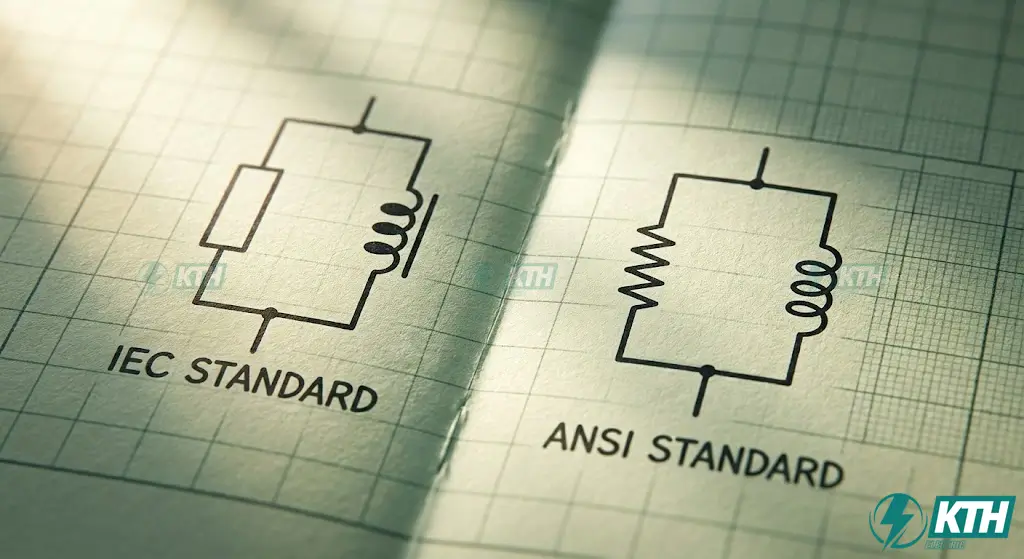
“The core difference lies in visual philosophy: IEC 60617 (Vietnam/Europe) uses logical, rectangular ‘box’ shapes, while ANSI Y32.2 (North America) uses ‘pictorial’ shapes mimicking physical components. Confusing the two is the primary cause of schematic errors.”
If you work in Vietnam or the global market, you live in a “hybrid” world. You might design systems using IEC 60617 (the International Electrotechnical Commission standard used in Europe, Asia, and Vietnam) but maintain equipment imported from the US that follows ANSI Y32.2 (American National Standards Institute).
Confusing these two is the #1 cause of schematic misinterpretation.
1. The Visual Philosophy
- IEC 60617 (The “Box” Logic)
The IEC standard favors simplicity and ease of drawing. It often uses rectangular boxes with internal symbols to denote function. It is logical and clean but can sometimes feel abstract.
- ANSI Y32.2 (The “Pictorial” Logic)
The ANSI standard is older and often more “pictorial.” It tries to mimic what the component physically does or looks like (e.g., a resistor looks like a wire slowing down current).
2. The “Big Three” Comparison
Here are the three most common points of confusion we encounter at KTH Electric:
| Component | ANSI Symbol (North America) | IEC Symbol (Vietnam/Europe) | The Engineer’s Note |
|---|---|---|---|
| Resistor | Zigzag Line (Looks like a spring) | Rectangular Box | The zigzag mimics “resistance” to flow. The box is standard in CAD software like EPLAN. |
| Inductor | Looped Coil | Solid Semi-circle Humps | ANSI looks like a literal wire coil. IEC looks like a filled solid wave. |
| Logic Gates | Distinct Shapes (D-shape for AND, Shield for OR) | Square Box with symbols (&, ≥1) | ANSI is much faster to read visually. IEC requires reading the internal math symbol. |
If you are working on a project in Vietnam involving state contracts, TCVN standards align closely with IEC. However, if you are servicing a Carrier or Trane HVAC unit imported from the US, you must switch your brain to ANSI mode.
III. Power & Grounding: The Starting Point
“Every schematic must have a defined source and return. Distinguish carefully between Earth Ground (Safety/PE), Chassis Ground (Frame), and Signal Ground (0V Reference) to prevent noise interference and ensure personnel safety.”
Every circuit begins with a source and ends with a return. Misinterpreting these symbols is not just a functionality issue; it is a safety hazard.
[Image of DC vs AC voltage source symbols schematic]1. Voltage Sources & Batteries
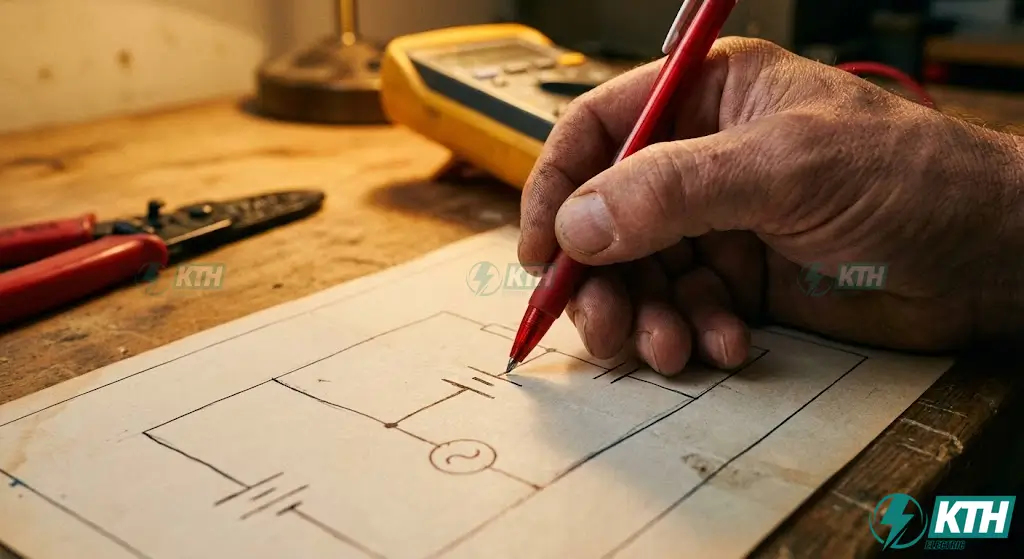
- DC Voltage Source: Often represented as a circle with V+ and V- inside, or a battery symbol.
- Battery (Single Cell): A pair of parallel lines. The longer line is ALWAYS positive (+), and the shorter, thicker line is negative (-).
- Battery (Multi-Cell): A series of single-cell symbols with dotted lines in between.Mistake Alert: Don’t count the lines to determine voltage (e.g., “4 lines means 6V”). The symbol is generic; the text label (e.g., “12VDC”) is the truth.
2. Grounding Symbols (The Safety Criticals)
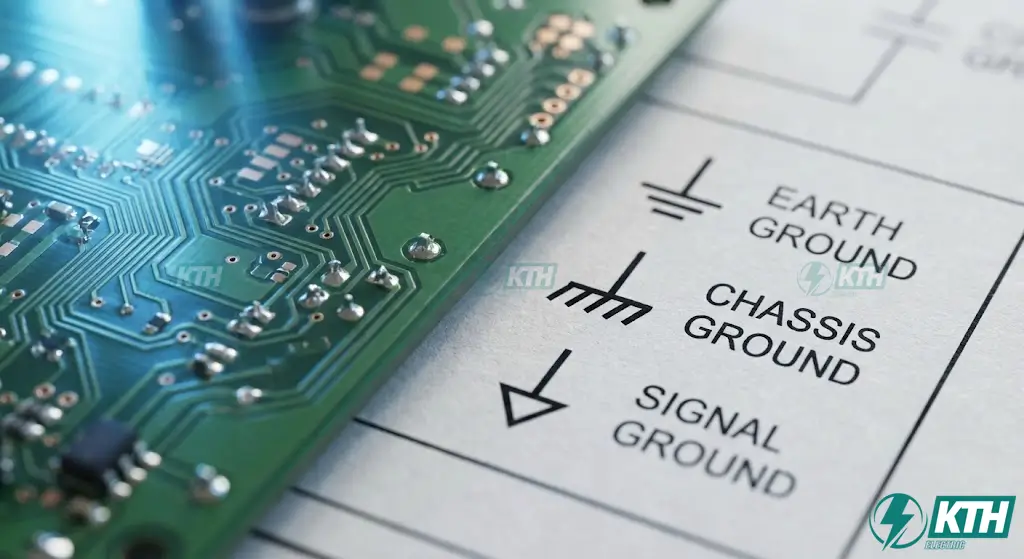
This is where “ghosts” in the machine appear. If you connect your signal ground to a noisy chassis ground, your sensitive electronics will fail.
Earth Ground (PE – Protective Earth)
Symbol: A vertical line ending in three horizontal lines that get smaller (like an inverted pyramid) or sometimes a circle with a “pitchfork” inside (IEC).
Meaning: Connects to the actual dirt/earth rod. It is for SAFETY.
Chassis Ground
Symbol: A shape that looks like a rake (three diagonal lines pointing down).
Meaning: Connects to the metal frame of the device (e.g., your car’s body). It may or may not be connected to Earth.
Signal/Digital Ground
Symbol: An empty or filled triangle pointing down.
Meaning: The 0V reference point for your circuit board.
Troubleshooting Tip: If you hear a “hum” in an audio amplifier or see jitter in sensor data, check if the schematic ties Signal Ground directly to a noisy Chassis Ground. They should often be isolated or connected at a single “star point.”
IV. Passive Components: The Circuit Backbone
“Passive components control the flow of energy. Key symbols include the Resistor (Zigzag/Box), Capacitor (Parallel Lines/Curved Plate for polarity), and Inductor (Coils). Always verify polarity marks (+) on electrolytic capacitors to avoid explosion hazards.”
Passive components do not generate power, but they control it. They are the “traffic lights” and “speed bumps” of your circuit board.
1. Resistors (Current Limiters)
- Fixed Resistor: As mentioned, a zigzag (ANSI) or box (IEC).
- Potentiometer (Pot): A resistor symbol with an arrow pointing to the middle of it. This represents the “wiper” (the knob you turn).
Crucial Detail: It has 3 terminals. - Rheostat: Similar to a pot but with only 2 terminals used (the wiper and one end). Used for high-power current control.
- Varistor (MOV) / Thermistor: Look for a resistor symbol with a diagonal line passing through it that has a little “foot” or checkmark at the end. These are protection devices.Context: If you see this across the AC input lines, it’s likely a MOV (Metal Oxide Varistor) designed to absorb voltage spikes (surge protection).
2. Capacitors (Energy Storage)
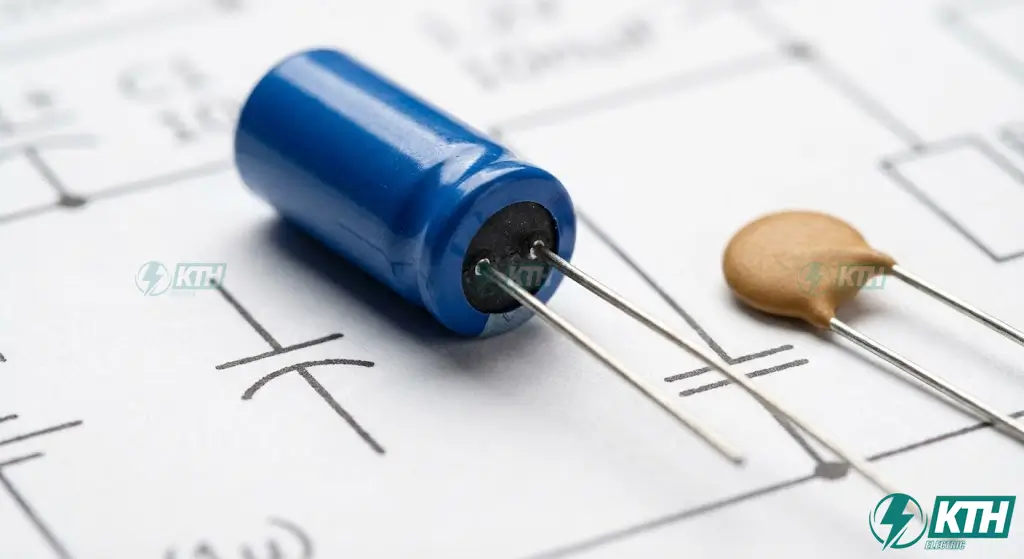
The silent killer of circuit boards. Putting a polarized capacitor in backward results in a literal explosion.
[Image of Capacitor symbols polarized vs non polarized]- Non-Polarized Capacitor (Ceramic/Film): Two parallel lines of equal thickness separated by a gap. (ANSI sometimes uses one curved line and one straight line, but standard non-polarized is usually two straight lines).
- Polarized Capacitor (Electrolytic/Tantalum):
- IEC: A box with a generic plus sign (+).
- ANSI: One straight line (positive) and one curved line (negative).
- Rule of Thumb: The curved line represents the casing (negative), and the straight line is the anode (positive). Always look for the tiny “+” sign to be sure.
3. Inductors & Transformers
- Air Core Inductor: A simple looped coil or solid humps.
- Iron Core Inductor: The same coil symbol but with two parallel solid lines drawn above or next to it. These lines represent the iron bar that magnifies the magnetic field.
- Transformer: Two inductor coils facing each other with lines (core) in between.Step-Up vs. Step-Down: Count the “bumps” or loops on the schematic? No. Never rely on the drawing’s loop count. Look at the ratio written (e.g., “240V : 24V”).
V. Semiconductors: The Active Switchers
“Semiconductors act as valves and amplifiers. The Diode allows one-way flow (Triangle > Line). Transistors amplify/switch: Remember ‘Not Pointing iN’ for NPN BJTs and check gate-channel gaps for MOSFETs.”
While passive components control flow, semiconductors act as the “valves” and “decision makers” of the circuit. This is where modern electronics truly begin.
1. Diodes (The One-Way Valve)
The basic function of a diode is to allow current to flow in only one direction.
- Standard Rectifier Diode: Represented by a triangle pointing at a vertical line.The Mnemonic: Imagine the triangle is an arrow. Current flows in the direction of the arrow (Anode to Cathode). The vertical line represents a wall—current cannot flow back.
- Zener Diode: Similar to the standard diode, but the vertical line has “bent” tips, resembling the letter “Z”.Function: It allows current to flow backward only when a specific voltage is reached (regulation).
- Light Emitting Diode (LED): A standard diode symbol with two small arrows pointing AWAY from the triangle.Meaning: Energy is leaving the device as light.
- Photodiode: A standard diode with two small arrows pointing INTO the triangle.Meaning: Light is entering the device to generate current (sensing).
2. Transistors (The Amplifiers & Switches)

Transistors are the hardest symbols to memorize because there are so many variations. However, you only need to master two main families: BJT and FET.
Bipolar Junction Transistors (BJT)
These are current-controlled switches.
- NPN Transistor: The arrow on the Emitter leg points OUTWARD (Not Pointing iN).
- PNP Transistor: The arrow on the Emitter leg points INWARD (Pointing iN).
Why it matters: If you swap an NPN for a PNP, your circuit won’t just fail; it will likely short your power supply because the polarity logic is reversed.
Field Effect Transistors (FET)
These are voltage-controlled switches (common in power supplies and processors).
- MOSFET (Metal-Oxide-Semiconductor FET): Look for a vertical line representing the “Channel” separated by a gap from the “Gate” (the parallel line).
- N-Channel: The arrow on the center substrate line points INward.
- P-Channel: The arrow points OUTward.
Note: Yes, the arrow logic is often the opposite of BJTs depending on the drawing standard, so always double-check the datasheet!
VI. Electromechanical & Switchgear
“Physical components like switches and relays involve movement. Note that Relay Coils (Control) and Relay Contacts (Switch) are often separated on a schematic. Always use cross-reference numbers to link them.”
In industrial automation (PLC panels) or home wiring, you are dealing with physical movement.
1. Switches
- SPST (Single Pole Single Throw): A simple break in the line with a “latch” that closes it.
- Pushbuttons:
- Normally Open (NO): The bar is hovering above the terminals. Pressing it connects them.
- Normally Closed (NC): The bar is resting below the terminals, already touching them. Pressing it breaks the connection.
- Limit Switch: Used in automation to detect when a machine arm hits the end. The symbol looks like a switch with a small triangle or “wedge” on the actuator arm.
2. Relays & Contactors
A relay is a switch controlled by an electromagnet. In schematics, the Coil (the magnet) and the Contacts (the switch) are often drawn far apart!
- Relay Coil: Usually a rectangle (IEC) or a circle (ANSI) with the letter “K” or “CR” (Control Relay).
- Relay Contacts: Drawn like normal switches but labeled with the same name as the coil (e.g., Coil “K1” triggers Contact “K1”).
3. Protection Devices
- Fuse:
- ANSI: A wavy “S” curve inside a break in the line.
- IEC: A rectangle with a straight line passing through it.
- Circuit Breaker: Often looks like a switch with a curved line (thermal trip) and a sharp angle (magnetic trip) drawn near it.
VII. Wiring & Connectivity Logic
“To distinguish between a connection and a crossover: Look for the DOT. A solid dot at an intersection means connected. No dot means wires are just passing over each other.”
How do you know if two crossing lines are connected or just passing over each other?
The Junction Dot:
- Connected: A solid black dot at the intersection means the wires are soldered or screwed together.
- Not Connected: If lines cross without a dot, they are not connected.
Legacy ANSI Note: Older American drawings might show a little “hump” or bridge to show a wire jumping over another. Modern CAD mostly uses the “no dot” method for simplicity.
VIII. Residential & Architectural Symbols (Blueprint Mode)
“Architectural plans focus on location, not circuit logic. Common symbols include the Duplex Receptacle (Circle with lines) and Lighting points. A ‘$S3$’ denotes a 3-way switch for dual-location control.”

If you are renovating a house or office in Ho Chi Minh City, you won’t see schematic symbols. You will see Architectural Symbols. These show location, not circuit logic.
- Duplex Receptacle (Power Outlet): A circle with two parallel lines running through it.GFCI / RCD: The same circle with “GFCI” or “WP” (Weatherproof) written next to it.
- Switches: A simple “$”, or a letter “S” with a line through it.$S_3$: A “Three-Way Switch” (allows controlling a light from two locations, like top and bottom of stairs).
- Lighting:
- Ceiling Light: A circle with a cross (X) or four short lines radiating out.
- Recessed Light (Can Light): A circle with one diagonal slash.
IX. Practical Application: How to Read Like a Pro
“Follow the flow: Identify rails (Power/Ground) -> Trace the Net -> Check Reference Designators (R, C, Q, U). Never assume power rating based on symbol size; always check the Bill of Materials.”
Learning the symbols is step one. Step two is reading the “sentence.” Here is the workflow we teach our junior engineers at KTH Electric:
- Identify the Rails:
Find the High Voltage line (top or left) and the Ground/Common line (bottom or right). Current generally flows from top-left to bottom-right. - Trace the “Net”:
Don’t just stare at the component. Follow the line (the “Net”). If a line is labeled “5V_SYS”, find every other place on the schematic with that same label. They are all connected. - Check the Reference Designators:
R = ResistorC = CapacitorQ = TransistorU or IC = Integrated CircuitK or RY = RelayF = FuseT or XFMR = Transformer
X. Conclusion
Electrical symbols are the vital link between a design concept and a working machine. Whether you are reading an IEC diagram for a factory in Vietnam or an ANSI blueprint for a project in the US, the ability to decode these lines and shapes is what separates a guesser from an engineer.
Don’t let a simple symbol confusion lead to a blown circuit or a safety hazard. Keep this guide handy, respect the standards, and always double-check your grounds.
Ready to upgrade your electrical systems?
If you need professional assistance with industrial electrical design, panel building, or troubleshooting complex schematics in Vietnam or the US, contact us today.
Company: KTH Electric Co., Ltd.
Hotline: 1 (336) 341-0068
Hotline: 0968.27.11.99
XI. Frequently Asked Questions (FAQ)
1. Why do some schematics use a jagged line for resistors and others use a box?
It depends on the standard. The jagged line is the ANSI (American) standard, commonly used in the US and legacy schematics. The rectangular box is the IEC (International) standard, used in Europe, Vietnam, and most modern international projects. Both represent the exact same component.
2. How can I tell if a capacitor is polarized on a schematic?
Look for a plus sign (+) next to one of the plates, or check if one plate is curved (ANSI standard). The curved plate is the negative side. If the symbol consists of just two straight parallel lines with no markings, it is a non-polarized (ceramic/film) capacitor.
3. What is the difference between an Electrical Schematic and a Wiring Diagram?
A Schematic shows the logical connection of a circuit (how it works) and does not necessarily represent physical layout. A Wiring Diagram shows the physical connections (where the wires actually go, color codes, and terminal locations). You use a schematic to design/debug, and a wiring diagram to build/install.
4. Where can I download free electrical symbols for AutoCAD?
Many manufacturers (like Schneider Electric or Siemens) offer free CAD blocks. You can also find community libraries on sites like GrabCAD or pay for professional libraries compatible with AutoCAD Electrical.
5. What does the arrow direction on a transistor mean?
The arrow indicates the direction of conventional current flow.
- NPN (BJT): Arrow points OUT (Emitter).
- PNP (BJT): Arrow points IN (Emitter).
- N-Channel (MOSFET): Arrow points IN (Center).
- P-Channel (MOSFET): Arrow points OUT (Center).
- Note: Always verify MOSFET symbols as they can vary by standard.
XII. Master Reference: Complete Symbol Cheat Sheet
Below is the comprehensive library of electrical and electronic symbols used in modern engineering. Bookmark this section for quick reference during your design or troubleshooting process.
1. Wires & Connectivity

Conductor of electrical current

Crossed connection (Dot = Yes)

Wires crossing without contact

Group of wires (Data/Address)
2. Grounding Systems

Zero potential reference (Safety)

Connected to device frame

Common reference point
3. Passive Components

Opposes current flow (Zigzag)

Standard rectangular box

3-terminal adjustable resistor

Stores electric charge (Non-pol)

Electrolytic (Watch polarity!)

Generates magnetic field
4. Switches & Relays

Toggle switch (Open/Close)

Normally Open (Momentary)

Electromechanical switch

Overcurrent protection
5. Semiconductors (Diodes & Transistors)

Current flows Anode > Cathode

Emits light when active

Voltage regulation

Arrow points OUT

Arrow points IN

N-Channel MOSFET
6. Power Sources & Meters

Generates constant voltage

DC Power Source

Measures Voltage (Parallel)

Measures Current (Series)
7. Digital Logic Gates

Output 1 if ALL inputs are 1

Output 1 if ANY input is 1

Inverter (0->1, 1->0)
📥 Download the Complete Engineering Guide
Need to access these symbols offline? Download our high-resolution Electrical Symbols Handbook (2026 Edition). Includes the full printable Cheat Sheet, perfect for pinning to your workshop wall or carrying in your tablet.
*File Size: 2.5MB | Format: High-Res PDF | No Sign-up Required