

Ultimate Guide: Three Way Switch Wiring Diagram & Installation (2025 Edition)
Reviewed By: Senior Electrical Engineer (20+ Years Experience)

1. Mastering Multi-Location Lighting Control
QUICK SUMMARY
A three-way switch system uses two switches to control one fixture from different locations. Unlike single-pole switches, it utilizes “traveler wires” to create alternative current paths, solving the safety hazard of traversing dark areas like staircases.
Have you ever walked up a dark staircase, fumbled for a switch at the bottom to light your way, and then—once safely at the top—realized you have to walk back down to turn it off? It’s a nuisance, a safety hazard, and frankly, bad electrical design.
This is exactly why the three-way switch exists.
Unlike a standard single-pole switch that simply breaks a circuit like a drawbridge, a 3-way switch circuit is a sophisticated system that allows you to control a single light fixture (or a set of lights) from two distinct locations. You see them in hallways, garages, large living rooms, and, inevitably, staircases.
As an electrical engineer with over two decades of experience in residential and commercial systems, I’ve seen homeowners intimidated by the extra wires. A standard switch has two terminals; a 3-way switch has three (plus a ground). That extra terminal changes everything. It introduces the concept of “Traveler Wires”—the secret highways that allow the current to alternate paths.
In this comprehensive guide, we are going to strip away the confusion. We won’t just give you a three way switch wiring diagram; we will teach you how to read it, how to execute it safely, and how to troubleshoot it when things go wrong. Whether you are roughing in a new house or retrofitting an older one, this is the only guide you will need.
2. Essential Safety Protocols & Electrical Tools
SAFETY FIRST
Before starting, always Kill the Power at the main breaker, Verify absence of voltage with a tester, and use Lockout/Tagout procedures. Essential tools include 14/12 AWG wire strippers, Lineman’s pliers, and a multimeter.
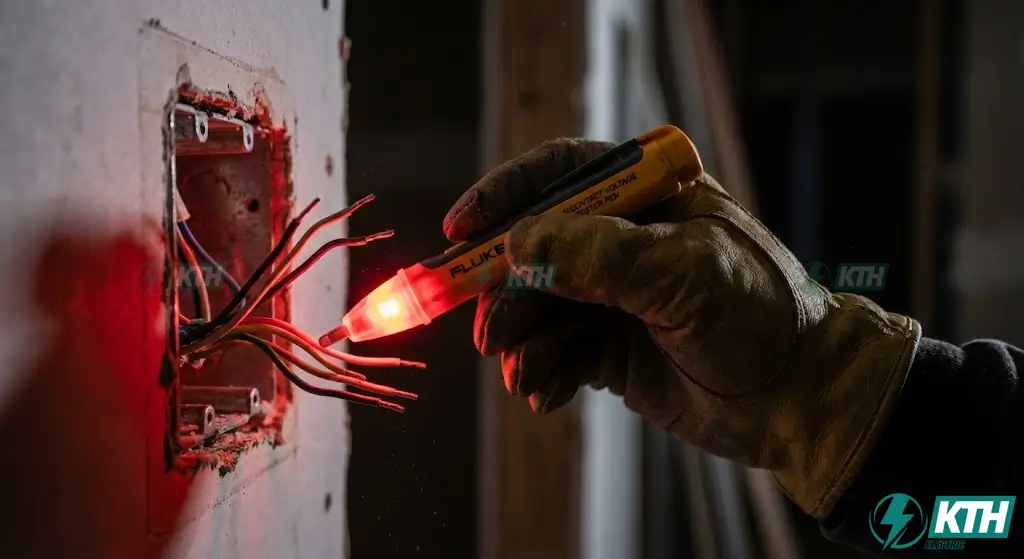
Before we even touch a screwdriver, we need to talk about safety. Electricity is instantaneous and invisible. In my line of work, we have a saying: “There are old electricians, and there are bold electricians, but there are no old, bold electricians.”
The “Zero Tolerance” Safety Rules
1. Kill the Power
Never work on a “hot” circuit. Go to your main breaker panel, locate the circuit breaker controlling the room (usually a 15A or 20A breaker), and flip it to the OFF position.
2. Verify, Then Verify Again
Just because the label says “Kitchen” doesn’t mean the outlet you’re working on is actually on that circuit. Use a Non-Contact Voltage Tester. Place the tip near the switch faceplate and wires. If it beeps or lights up red, the power is still live.
3. Lockout/Tagout (Home Edition)
If you are working in a large house or a commercial building, tape a note over the breaker you just turned off. You don’t want a helpful family member flipping it back on while your hands are on bare copper.
Required Tools Checklist
To perform this electrical system maintenance professionally, you need the right gear. Don’t use kitchen scissors to strip wires.
- ✔
Wire Strippers:Handle 14 AWG (15A) & 12 AWG (20A). - ✔
Lineman’s Pliers: Essential for twisting solid copper. - ✔
Non-Contact Voltage Tester: Your primary safety net. - ✔
Screwdrivers: Both Philips (No. 2) and Flathead. - ✔
Multimeter: Crucial for identifying wires (like how to test a capacitor). - ✔
Electrical Tape & Wire Nuts: Standard safety consumables.
3. Anatomy of a 3-Way Switch System
KEY COMPONENTS
A 3-way switch features four terminals: One Common (Black) screw for Line/Load, two Traveler (Brass) screws for communication between switches, and one Ground (Green) screw. It requires 14/3 cable containing an extra red wire.
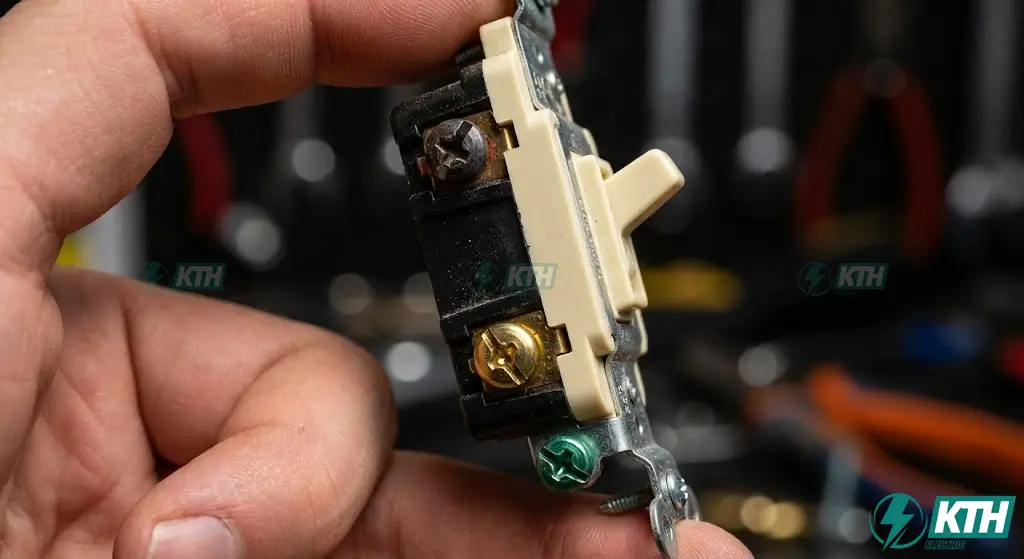
To understand a 3-way switch wiring diagram, you must first understand the component itself. If you look at a standard single-pole switch, you’ll see “ON” and “OFF” stamped on the toggle. Look at a 3-way switch, and those markings are gone. Why? Because “Up” isn’t always “On.” It depends on the position of the other switch.
Decoding the Terminals
A 3-way switch has four screws (terminals). Identifying them correctly is 90% of the battle.
The Cable Hierarchy: 14/2 vs. 14/3
In a 3-way setup, you will see two types of Romex (NM-B) cables:
- 14/2 Cable (Black, White, Ground): This is used for your power feed from the panel and the “switch leg” going up to the light.
- 14/3 Cable (Black, Red, White, Ground): This is the Traveler Cable. The extra red wire allows us to have two separate paths for the current to travel between the switches.
4. Master Wiring Diagrams: 4 Critical Scenarios
In the real world, not every house is wired the same way. The path the electricity takes from the breaker panel to the light fixture determines how you wire the switches. Below are the specific wiring diagrams for the most common scenarios found in residential construction.
Scenario A: Power Feed at First Switch (The “Standard” Layout)
This is the most modern and logical configuration. The power comes from the breaker panel directly into the box for Switch 1. Then, a traveler cable runs to Switch 2, and finally, a wire runs from Switch 2 to the Light Fixture.
At Switch Box 1 (Line Side):
- Source Power: Incoming Black (Hot) → Common (Black) Screw.
- Neutral: Incoming White → Outgoing 14/3 White (Wire nut). Note: Neutral does not connect to switch.
- Travelers: 14/3 Black & Red → Traveler (Brass) Screws.
At Switch Box 2 (Load Side):
- Travelers: Incoming Black & Red → Traveler (Brass) Screws.
- Common: Common (Black) Screw → Black wire to light (Switch Leg).
- Neutral: Incoming 14/3 White → White wire to light.
Result: The power enters Switch 1’s Common, travels through either the Red or Black traveler wire to Switch 2, exits Switch 2’s Common, and powers the light.
Scenario B: Power Feed at the Light Fixture (The “Switch Loop”)
If your home was built before the 1990s or early 2000s, you might find this setup. The power runs from the panel to the ceiling box (the light), and then a single cable drops down to the switches. This is often confusing because you might see a white wire connected to a switch.
Author’s Note: This method is less common in new construction due to NEC requirements for neutrals at switch locations, but it is vital for renovations.
At the Light Fixture Box:
- Source Power: Incoming White (Neutral) → Light Fixture’s Silver screw.
- Source Hot: Incoming Black (Hot) → Black wire heading to Switch 1.
- Return: White wire returning from Switch 2 (which is now “Hot”) → Light Fixture’s Brass/Black screw. Crucial: You must wrap this white wire with black electrical tape to indicate it is hot.
At Switch Box 1:
- Pass-Through: The incoming Black wire connects to the Common terminal. The travelers pass through to Switch 2 via a 14/3 cable.
At Switch Box 2:
- The travelers connect to the brass screws.
- The Common terminal sends the power back up to the light via the white wire (taped black).
(In this scenario, the white wire is acting as a “switch leg,” not a neutral. This is the most common point of failure for DIYers.)
Scenario C: Light Fixture Between Two Switches
This is perhaps the trickiest configuration physically, though electrically it follows the same logic. Here, the power comes into Switch 1, goes up to the Light Fixture box, and then another cable continues on to Switch 2.
- Switch Box 1 (Source): Power In: Black (Hot) to Common. Travelers Out: A 14/3 cable runs up to the light fixture box. The Black and Red travelers connect to the brass screws. The White neutral connects to the source neutral.
- Light Fixture Box (Junction): The Black and Red travelers from Switch 1 do not connect to the light. They are wire-nutted directly to the Black and Red travelers going to Switch 2. They simply pass through. Neutral: The source Neutral (White) connects to the Light Fixture. The Return: The White wire coming back from Switch 2 (marked with black tape) connects to the Light Fixture’s hot terminal.
- Switch Box 2 (Dead End): Travelers: Black and Red to brass screws. Common: The White wire (taped black) connects to the Common screw to send power back to the light.
Scenario D: Power Feed at Second Switch (Reverse Feed)
This scenario often occurs in renovations where power is easily accessible at the far end of a room (Switch 2) rather than the entry point (Switch 1). While less intuitive, the physics remain identical: power enters the system, travels through the switches, and exits to the light. Ensure you perform a thorough electrical system assessment to confirm which box actually contains the line feed before beginning.
- Switch Box 2 (Line Side & Load Connection): Source Power: The incoming Black (Hot) connects to the Common terminal of Switch 2. Travelers Out: A 14/3 cable runs to Switch 1. Black and Red connect to the traveler screws. The “Pass-Back”: This is the unique part. The White wire in the 14/3 cable is not used as a neutral here. Instead, it is connected to the Common terminal of Switch 1 (at the other end). At Switch 2’s end, this White wire (marked with black tape) connects to the Black wire going to the light fixture.
- Switch Box 1 (Dead End): Travelers: Black and Red connect to traveler screws. Common: The White wire (taped black) connects to the Common screw, sending the switched current back to Box 2 to feed the light.
5. Step-by-Step Installation Procedure (Standard Feed)
EXECUTION PLAN
We will build Scenario A. Process: Rough-in cables -> Strip wires -> Connect Line Side (Source to Common, Travelers to Travelers) -> Connect Load Side (Light to Common, Travelers to Travelers) -> Final Safety Check.

Now that you can visualize the circuit, let’s build it. We will assume Scenario A (Power → Switch 1 → Switch 2 → Light) as it is the industry standard for new wiring and offers the most stability for long-term electrical system maintenance.
Phase 1: The Rough-In
Run a 14/2 NM-B cable from your breaker panel to the first switch box. Run a 14/3 NM-B cable between the two switch boxes. Finally, run a 14/2 NM-B cable from the second switch box to the light fixture. Secure all cables with staples within 12 inches of each box to prevent strain.
Phase 2: Preparation
Strip the outer white/yellow jacket off the cables inside the box, leaving at least 6 inches of free conductor. Strip about 3/4 inch of insulation off the ends of each copper wire.
Pro Tip: Understanding Ampere explained guides is useful here; ensure your wire gauge matches the circuit amperage. Use the gauge hole on your wire strippers to loop the wire ends into a “J” hook. Always loop the wire clockwise around the screw terminal so tightening the screw pulls the wire tighter, rather than pushing it off.
Phase 3: Wiring Switch 1 (The Line Side)
- Grounding: Connect the bare copper wires to the green grounding screws on the switch and to the metal box (if applicable).
- Neutral: Connect the White wire from the power source directly to the White wire of the outgoing 14/3 cable using a wire nut. Push this to the back of the box. Do not connect it to the switch.
- The Hot (Common): Take the Black wire from the power source and hook it around the Black (Common) screw. Tighten securely.
- The Travelers: Take the Black and Red wires from the 14/3 cable. Connect one to the top brass screw and one to the bottom brass screw. The order does not matter.
Phase 4: Wiring Switch 2 (The Load Side)
- Grounding: Repeat the grounding process.
- The Travelers: Locate the incoming 14/3 cable. Connect the Black and Red wires to the Brass (Traveler) screws.
- The Switch Leg (Common): Locate the 14/2 cable going to the light. Connect its Black wire to the Black (Common) screw.
- The Neutral: Connect the White wire from the incoming 14/3 cable to the White wire of the outgoing 14/2 cable (going to the light). Use a wire nut.
Phase 5: Final Check & Mounting
Gently fold the wires into the box in an accordion “Z” shape. Ensure no bare copper from the hot wires is touching the side of the box or the ground wire. Screw the device into the box, attach the faceplate, and restore power.
6. Troubleshooting Common 3-Way Switch Faults
You flipped the breaker, walked into the room, and… nothing. Or worse, it works strangely. Here is how an electrical engineer diagnoses a 3-way circuit.
Symptom 1: The “Either/Or” Problem
The Issue: The light only works if Switch A is in a specific position (e.g., Up). If Switch A is Down, Switch B does nothing.
The Cause: Crossed Travelers. You likely confused a traveler wire with a common wire.
The Fix: Turn off power. Identify the source 14/3 cable. Ensure the Black and Red from that specific cable are only on the brass screws. The most common mistake is putting a traveler wire on the Black common screw.
Symptom 2: The “Dead Loop”
The Issue: The system doesn’t work at all, or the breaker trips immediately.
The Cause: Short to Ground. This immediate tripping is similar to how overload relays and trip curves function to protect equipment.
The Fix: This often happens when pushing the switch back into the box. The bare ground wire may have touched a “hot” terminal. Wrap the perimeter of the switch with electrical tape (covering the screws) before mounting it to prevent this.
Symptom 3: The Flicker
The Issue: Light flickers or crackles when the switch is toggled.
The Cause: Loose Connection (Backstabbing).
The Fix: Did you push the wires into the little holes on the back of the switch? We call that “backstabbing,” and it is notoriously unreliable. Loose connections create resistance and heat, which can be detected via a thermal scan electrical cabinet service, but in a home switch, it just leads to failure. Remove the wires and secure them properly around the side screw terminals.
7. NEC Code Compliance & Modern Best Practices
Electrical work is governed by the National Electrical Code (NEC). Ignoring these rules can void your home insurance or fail an inspection.
1. The “Neutral at Switch” Rule (NEC 404.2(C))
In the past, we often used “Switch Loops” (Scenario B) which didn’t bring a neutral wire to the switch box. Modern code generally requires a neutral wire at every switch location, even if the current switch doesn’t need it. Why? Smart switches. Wi-Fi enabled switches (like Lutron Caseta or Leviton Decora Smart) are part of what is IoT (Internet of Things) and require a neutral wire to power their internal radio. If you wire a home today without neutrals at the switch, you are future-proofing it poorly.
2. Box Fill Calculations
A 3-way switch setup involves a lot of wires (Source, Travelers, Switch Leg, Grounds). You cannot cram this into a shallow box. Rule of Thumb: For a standard 14-gauge circuit with a 3-way switch and two cables entering the box, you need a box volume of at least 18-20 cubic inches. Proper space management is akin to professional low voltage electrical cabinet maintenance; overcrowding causes heat buildup. Using a “Deep” single-gang box is highly recommended.
3. Wire Identification
If you use a white wire as a hot or traveler (like in Scenarios B, C, or D), the NEC mandates that you re-identify it. You must wrap the end of the white insulation with black or red electrical tape to signal to the next electrician that “This is NOT a neutral.” Consulting a guide on electrical symbols can help you understand standard markings.
8. FAQ: Expert Solutions to Specific Problems
Q: Can I use a 3-way switch as a single-pole switch?
Q: How do I follow a Leviton 3 way switch wiring diagram?
A: Wiring a Leviton 3 way switch is identical to generic brands, but pay attention to screw colors. On a Leviton, the Black screw is always Common. The two Brass/Silver screws are Travelers. Always check the specific leviton 3 way switch wiring manual included in the box.
Q: Wiring a 3 way switch with two lights: Is it possible?
A: Yes. For wiring 3 way switch with two lights (daisy chain), you simply run a 14/2 cable from the first light fixture to the second. Connect Black to Black and White to White at the first fixture. The switch controls the first light, which then feeds power to the second.
A: Yes. If you only have one location but bought a 3-way switch, simply connect your hot wire to the Common screw and your switch leg to one of the traveler screws. Leave the other traveler screw empty (and wrap it with tape).
Q: How do I install a dimmer in a 3-way circuit?
A: You generally replace one of the two mechanical switches with a 3-way dimmer. The wiring is identical: Common to Common, Travelers to Travelers. Note: You cannot usually put standard dimmers at both locations; the circuitry will conflict, causing strobing. You need a specific “Master/Slave” smart dimmer setup for that, often found in advanced energy monitoring solutions.
Q: What is a 4-way switch, and when do I need it?
A: If you want to control lights from three or more locations (e.g., top of stairs, bottom of stairs, and hallway), you need a 4-way switch installed between the two 3-way switches. Understanding the difference between devices, similar to the socket vs outlet vs receptacle distinction, is key. The 4-way switch literally swaps the traveler paths.
Q: Why does my smart switch have 4 wires but my wall only has 3?
A: Smart switches often have a “Line,” “Load,” “Neutral,” and “Ground.” A standard mechanical 3-way switch doesn’t separate Line and Load; it just directs traffic. If your smart switch requires a neutral and your box doesn’t have one (Scenario B), you cannot install it without rewiring the circuit. For more insights on modern electrical gear, check our list of top 7 essential books for electricians (2025).
Bonus: Common Terminology Confusion Cleared Up
3-Way Switch vs. Double Pole Switch
Many people search for a double pole switch connection when they actually want a 3-way switch. A real double pole switch is used for 240V appliances (like water heaters) and has 4 brass terminals. For lighting control from two places, you always need a 3-way switch (3 terminals).
3-Way vs. 2-Way Switch
In the US, we call them “3-Way Switches”. In the UK and Europe, they are called “2-Way Switches”. If you see a 2 way switch wiring diagram online, it’s likely the same circuit but with different terminology. However, do not confuse this with a simple “Single Pole” switch (on/off from one place).
Double Switch (Combo Device)
If you are looking for a double switch wiring diagram (two switches on one device body), this is a “Combo Switch” or “Stack Switch”. This is different from a 3-way system. It allows you to control two separate single-pole lights from one gang box.
Conclusion
Wiring a 3-way switch is a rite of passage for any serious DIYer. It transforms a house from “basic wiring” to “intelligent design.” By understanding the anatomy of the Common vs. Traveler terminals and following the current path logic, you can tackle any hallway or staircase project with confidence.
Remember, the goal isn’t just to make the light turn on. It’s to create a safe, code-compliant circuit that will last for decades. When in doubt, always consult the diagram, check your voltage, and if the wires don’t make sense—contact us for professional assistance.